


MS NOW: Watch Live News
4.11.09K Reviews
App Specs
- Version
- Varies with Device
- Updated On
- License
- Free
- Downloads
- 100,000+
- Developer
- Versant Media, LLC
- Categories
- News & Magazines
- Platform
- Android, iOS
Screenshots
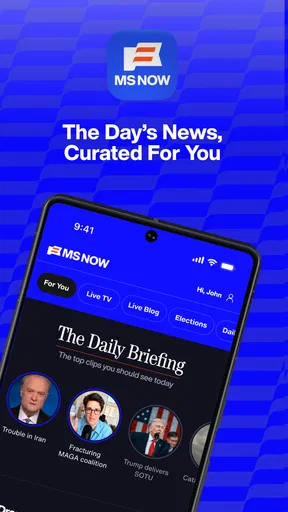

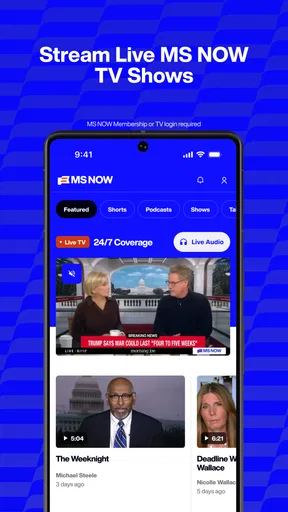
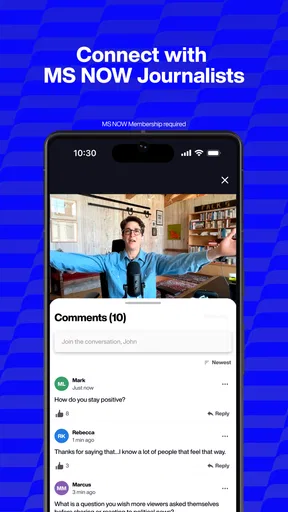
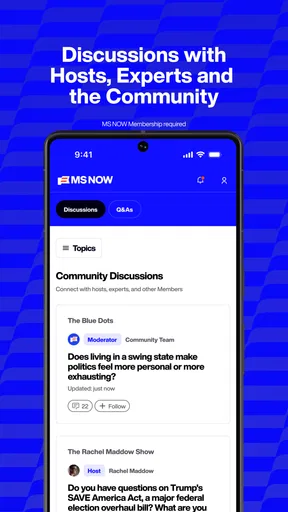
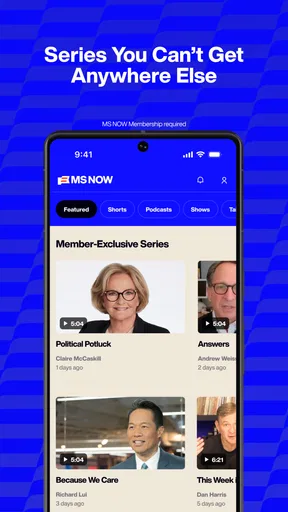
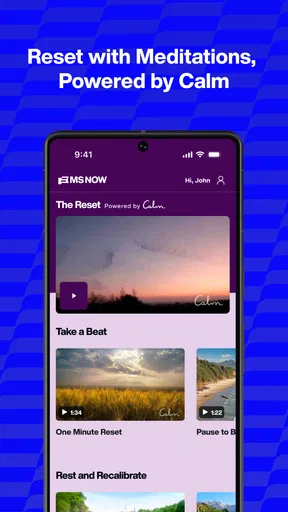
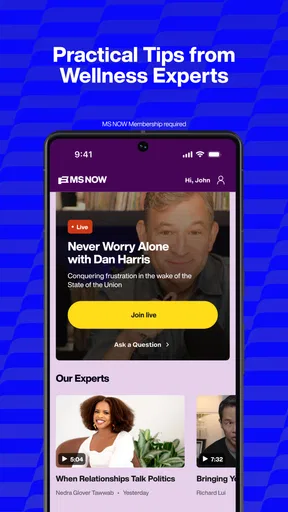
 Analysis by AppCompare
I usually want a news app to answer two simple questions quickly: what is happening, and can I follow the coverage without stopping everything else I’m doing? MS NOW: Watch Live News is built around watching news and listening to audio from the team formerly known as MSNBC. That focus makes it a more specific choice than a broad headline reader. I find it most useful when I want to keep up with that team’s coverage, rather than gather stories from every publisher in one place.
Where the first snags can happen
The main appeal is straightforward, but it is worth setting expectations before relying on the app. Live video and audio suit moments when I can listen or watch; they are not automatically the best way to scan headlines in silence or get a wide range of outlets. If you are opening it in a noisy place, during a meeting break, or somewhere with a weak connection, a stream may be less convenient than a text-based news app.
I would also separate the app’s core purpose from assumptions people sometimes make about news services. Its confirmed focus is video and audio from the MS NOW team. I would try it for that kind of coverage, not assume it will work like an all-in-one news aggregator, a searchable archive, or a replacement for every source I follow.
The app is free to download, while in-app purchases are listed at prices ranging from $7.99 to $249.99 per item. That makes it sensible to check the purchase details shown in the app before committing to anything. A free download does not mean every available option necessarily has no cost, and I would not treat a purchase as required for basic use without checking what the particular offer includes.
A few checks before relying on a stream
When video will not start, I would begin with the ordinary basics rather than assume the app itself is broken: check that the phone has a working internet connection, try a different connection if one is available, and reopen the app. If the problem happens only on mobile data or only on Wi-Fi, that contrast is useful. It can help distinguish a connection issue from a problem that follows the app across networks.
It also helps to decide what you want to do before opening it. If you have only a minute, listening to audio may fit better than watching video. If you need to keep your phone quiet, do not rely on sound as your only way to follow what is happening. I would test the app in the same kind of setting where I expect to use it—on a commute, during a break, or at home—rather than first discovering a snag when a major story is unfolding.
MS NOW is a news and magazines app from Versant Media, LLC. It is rated Teen, which is relevant if you are choosing apps for a younger person or checking what is appropriate for a shared device. The app has a 4.2 average from around 9.9K ratings, with about 1.1K written reviews, and has passed 100K installs. Those figures give a rough sense of its audience, but they cannot tell you whether its editorial focus suits your own habits.
Worth Reading Before You Choose

EA SPORTS FC Mobile 26 Is a Bigger Football Game, but It Takes Time

Flipboard Shows What News Apps Must Do Beyond the Feed

Switching to Android Auto Means Rethinking Your Driving Routine

Google Calendar Makes a Crowded Week Easier to Manage

Ludo King Makes the Most of the Minutes Between Plans

Baby Panda World Brings Quick Play to Modern Phones, but Its Game Library Feels Busy
Recovering a routine when playback falters
If a stream pauses or refuses to load, I would avoid repeatedly tapping different controls in a hurry. First confirm that other online services are working, then close and reopen the app and try again. If the same issue continues, switching between available network connections is a practical next check. These steps are not a guarantee, but they help narrow down whether the trouble is temporary or tied to the connection you are using.
For a time-sensitive story, I would keep a second route to the news in mind. That does not mean the app is unreliable; it means any live stream depends on a working connection and can be less useful than a quick text update when you are moving between coverage areas. If the immediate goal is simply to confirm a headline, a trusted news website or another text-focused source may be faster. I return to the app when I want its team’s live reporting or audio, not because I expect one format to be best for every moment.
When the issue may be outside the app
A stalled video can have more than one cause. A weak signal, a congested connection, or a phone temporarily struggling with other tasks can all make streaming feel worse. If audio or video behaves differently after moving to a stronger connection, that is a clue worth noticing. If the problem appears across several apps, I would look at the device or network before blaming this one alone.
There is a useful distinction between a playback problem and a content preference. If the stream works but the coverage is not what you want, changing networks or reopening the app will not solve that mismatch. The service is most compelling for someone who actively wants MS NOW’s reporting and voices. People who prefer comparing several editorial perspectives in one feed will likely be better served by a general news aggregator or by following multiple publications directly.
Features That Make MS NOW Stand Out
Alright, so first things first, what’s the deal with MS NOW? This app is all about delivering live news straight to your fingertips. You’ve got a plethora of channels to choose from, covering everything from politics to pop culture, and the interface is as smooth as butter. Trust me, you won’t find yourself lost in a maze of buttons here.
Live Streaming Like Never Before
One of the coolest features is the live streaming option. Imagine being able to catch the latest headlines as they happen, no matter where you are. I’ve tested this on both Wi-Fi and mobile data, and the streaming quality is pretty impressive. No more buffering nightmares!
Customizable News Feed
Now, here’s where things get personal. The app allows you to customize your news feed. You can pick and choose the topics that matter most to you. Whether it’s tech, sports, or international news, you’re in control. It’s like having your own personal news curator.
User-Friendly Interface
The app’s design is sleek and intuitive. Navigation is a breeze, and everything is right where you’d expect it to be. The colors are easy on the eyes, and the layout is pretty straightforward. You won’t need a tutorial to figure this one out.
Breaking News Alerts
This feature is a lifesaver. You can set up alerts for breaking news, so you’re always in the loop. Whether it’s a major event or a quick headline, you’ll get a notification right on your lock screen. It’s like having a newsroom in your pocket!
Why You Should Give It a Try
So, why am I raving about it? Well, for starters, it’s convenient. We all lead busy lives, and having an app that delivers news in real-time is super handy. Plus, the ability to watch live news on the go is a huge plus for those of us who can’t always be near a TV.
Additionally, the customization options mean you’re not bombarded with news stories you’re not interested in. It’s all about what you want to see, making your news experience tailored to your tastes.
Compatibility and Performance
The app runs smoothly on both Android and iOS. I’ve tried it on a couple of different devices, and it performs consistently well. No glitches or crashes to report, which is always a relief. It’s also light on resources, so it won’t hog your phone’s memory or battery life.
Download and Get Started
Getting started with MS NOW is a breeze. Simply head over to the App Store or Google Play, hit download, and you’re good to go. Setting up your preferences takes just a few minutes, and you’ll be plugged into the world of live news in no time.
How it fits into an everyday news routine
For me, the strongest use case is not watching continuously from morning to night. It is choosing a moment when live coverage adds something: putting on audio while making breakfast, checking in during a lunch break, or watching when a developing story is easier to understand with a presenter’s explanation. That makes the app a companion for particular parts of the day, rather than a substitute for every way I get news.
A realistic routine could be to listen while getting ready, then switch to a text source later if you need to verify a detail or compare how different outlets frame the same event. This division of labor is useful because it avoids asking a live stream to do what it is not designed for. Audio is convenient when your eyes are occupied, while text is easier to skim, revisit, or compare at your own pace.
If you are deciding whether it belongs on your phone, ask yourself whether you already seek out this team’s coverage. If you do, the focused access can save the extra step of finding a broadcast elsewhere. If you mainly want local alerts, a broad mix of international reporting, or headlines from many publishers, another news app may be a better daily home. That is not a knock on the app; it is simply the trade-off of choosing a source-centered experience.
Small habits that make it more useful
I would keep notifications intentional. Breaking updates can be helpful when you genuinely want immediate headlines, but frequent alerts can interrupt work or quiet time. Choosing only the alerts that matter to you—or disabling them when you need fewer interruptions—keeps the app from turning every phone check into a news break. The value is not in receiving the most notifications; it is in getting the ones you will act on.
Likewise, I would treat personalization as a way to make the experience more relevant, not as a guarantee that every important story will appear. A focused feed can reduce distractions, but it can also narrow what you happen to encounter. When an issue matters beyond your usual interests, deliberately checking another outlet is a sensible counterbalance. That is especially useful for major public events, where perspective and context matter as much as speed.
One question users often have is whether they need to watch with the screen on to keep up. The app’s stated role includes audio as well as video, so listening is a natural option when watching is inconvenient. I would choose the format based on the situation rather than leave video running by default: audio suits chores or a walk, while video is better when visuals help explain the story and you can give it attention.
Another practical question is whether this is a good first news app for a teenager. Its Teen content rating gives families a useful starting point, but I would still consider the individual’s maturity and the type of coverage they want to follow. For younger users, I would talk through how to compare sources and how to manage alerts, rather than assuming a rating alone settles every household’s preferences.
People also ask whether it can replace television news. If your priority is accessing this team’s coverage on a phone, it can be a convenient alternative to sitting near a TV. If you prefer a large screen, a fixed broadcast routine, or a broader mix of networks, television or another service may fit better. Portability is the advantage here; it does not make the app the right format for everyone.
Who I would recommend it to
I would recommend it to readers who already value MS NOW’s reporting and want a handy way to watch or listen away from a television. It is also a reasonable fit for people who prefer spoken coverage while doing something else and are comfortable using a focused news source alongside other outlets. The free download makes it easy to try, while the listed in-app purchase range is a reminder to review any paid option carefully before tapping through.
I would steer away from it if you want a neutral-feeling dashboard that gathers headlines from many publishers, if you mostly read brief summaries, or if you have little interest in this team’s coverage. A live-news app can feel less useful when you only have a few seconds and need a fast, silent scan. In those situations, a text-first news reader or a set of direct sources is likely to be more practical.
Download and Get Started
Getting started with MS NOW is a breeze. Simply head over to the App Store or Google Play, hit download, and you’re good to go. Setting up your preferences takes just a few minutes, and you’ll be plugged into the world of live news in no time.
So there you have it! If you’re on the hunt for a reliable, user-friendly news app, MS NOW: Watch Live News is definitely worth checking out. It’s got the features you need to stay informed without any of the fuss. Give it a spin and let me know what you think!
Pros
- User-friendly interface with intuitive navigation.
- Wide range of news channels available live.
- Customizable notifications for breaking news.
- High-quality video streaming without buffering.
- Offers a multilingual news experience.
Cons
- Requires a stable internet connection.
- Some content may be region-restricted.
- Limited offline viewing options.
- Occasional ad interruptions during streams.
- Subscription needed for premium features.
FAQs for MS NOW: Watch Live News
What is MS NOW: Watch Live News?
MS NOW is a mobile application designed to provide users with access to live news broadcasts from various global networks. It offers a seamless streaming experience on both Android and iOS devices, allowing users to stay updated with current events anytime, anywhere.
How can I customize my news feed in MS NOW?
MS NOW allows you to personalize your news feed by selecting topics or channels of interest. You can adjust these preferences in the app settings, ensuring that you receive news updates that are most relevant to you. The app also learns from your interactions to suggest content.
Does MS NOW support offline viewing?
Currently, MS NOW requires an internet connection to stream live news. However, the app may offer features to download specific news clips for offline viewing in future updates. Users can check the app's latest version or support page for any updates on this feature.
Are there any subscription fees for using MS NOW?
MS NOW offers a free version with access to a wide range of news channels. However, there might be premium subscription options that provide additional features such as ad-free viewing, exclusive content, or early access to new features. Users can explore these options in the app's purchase section.
Is MS NOW available in multiple languages?
Yes, MS NOW supports multiple languages to cater to a global audience. Users can select their preferred language in the app settings. This feature makes it easier for non-English speakers to access and understand the news content. Availability of languages may depend on the news channel's offerings.


